
Features
Every tool you will need to sell is in this panel.
All 88 features on this page work today and are in the same package. Tap a heading to jump to it.
- Orders and selling8 features
- Payments5 features
- Invoices, shipping, stock5 features
- Marketplaces9 features
- Products and catalogue8 features
- Design and content8 features
- Marketing and SEO15 features
- Customer experience6 features
- Wholesale and B2B3 features
- Abroad, languages, currency9 features
- Supply Network6 features
- Team, security, reports6 features
Where a feature needs a contract with another company or a key of your own, its box says so. What we are working on is listed separately at the end.
01Orders and selling
Orders from your site, the phone or your shop all land in one list
You type in the order you took on the phone or on WhatsApp and ring up shop sales at the till. Shipping, cancelling or exporting is done for many orders at once, not one by one.
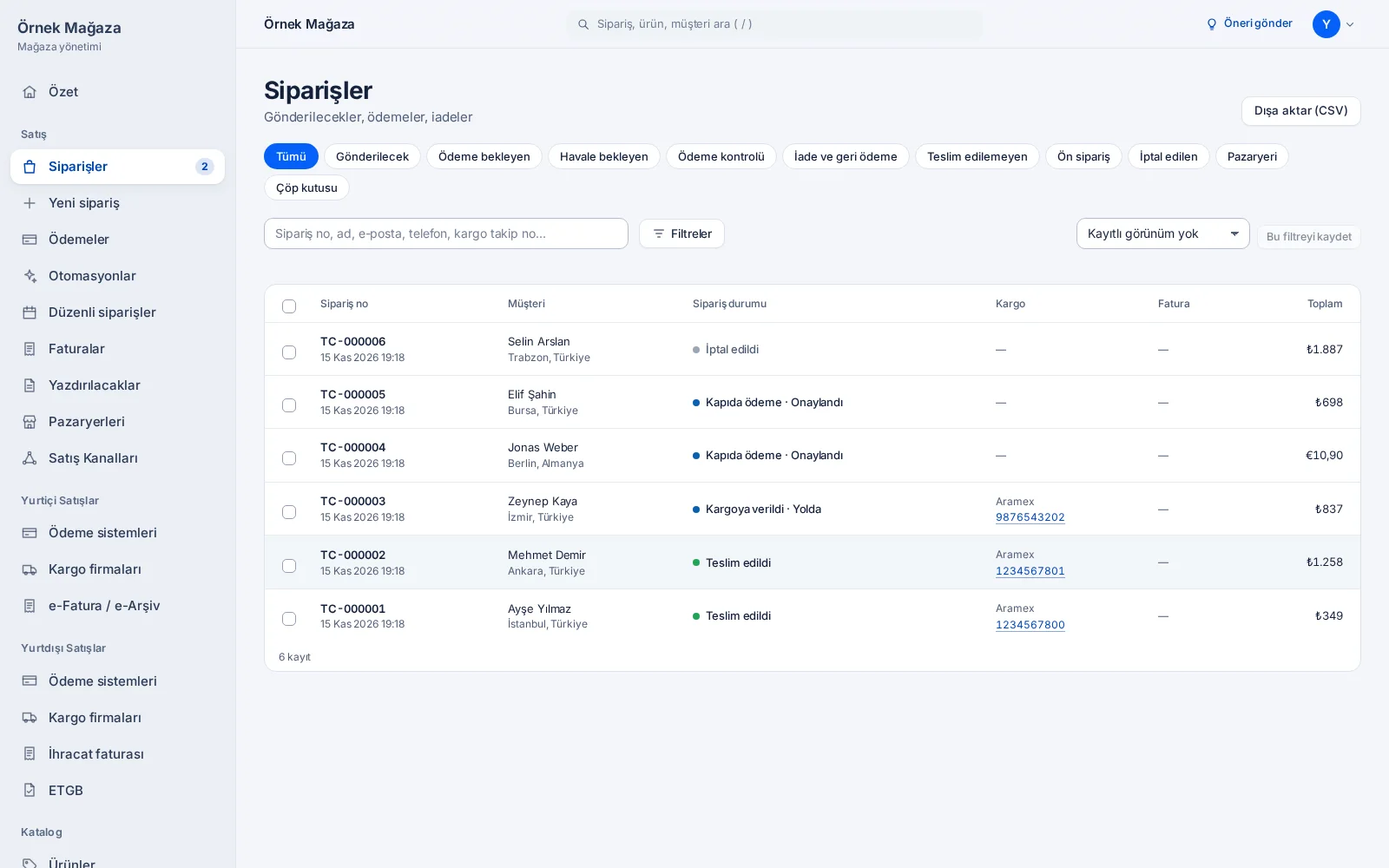
Order management
To ship, payments and returns in one list. Mark selected orders paid, shipped or delivered in bulk, cancel them, download them as CSV and save the filters you use often.
Who it is for Every store
Orders taken by phone or chat
Enter an order you took by phone, on WhatsApp or in the shop. It works like any order: stock is reserved and the e-mails go out. For a card payment you send the customer a payment link.
Who it is for Selling by phone and chat · Stores with a shop
Till: sales in your shop
Record a sale made in your shop in cash or by card. The order is marked paid and delivered and the stock goes down; the site and the shop sell from the same stock.
Who it is for Stores with a shop
You take the payment with your own card terminal or in cash; the till records the sale and does not connect to a terminal.
Payment links
Pick products and send the link on WhatsApp, Instagram or by e-mail. The customer pays on your store's checkout; the link sells until you close it or it expires.
Who it is for Selling by phone and chat · Every store
Order automations
“When an order does this and these conditions hold, do that” rules, without code. By amount, country, payment method, first order or product tag: tag the order, assign it to a team member or e-mail the customer.
Who it is for Every store · Teams
Repeat orders
Your customer starts a repeat order from their account. When it is due, a payment link goes out by e-mail; no payment is taken without the customer's approval.
Who it is for Repeat sellers
Returns and partial shipping
Ship an order in parts. Handle return requests, return reasons and refunds on the order's own screen.
Who it is for Every store
Digital products and licence keys
Products without shipping are delivered digitally once paid. Game codes, wallet codes or software licences come from a pool per variant: each sale sends one code by e-mail, and the pool is the stock.
Who it is for Digital sellers
02Payments
Your customer pays by card, and your rules send it to the right POS
You connect your bank's virtual POS or a payment institution such as iyzico or PayTR. With several POS, each payment goes to the card's own bank or to the cheapest POS by the rates you entered; if one fails, the next takes over.
Over 40 payment providers
Banks' virtual POS (Ziraat, Garanti BBVA, Yapı Kredi, VakıfBank, Kuveyt Türk and the banks on NestPay), payment institutions such as iyzico, PayTR, ZiraatPay, Param, Sipay and Moka; for abroad Stripe, PayPal, Adyen and Klarna.
Who it is for Every store
Each needs your own contract with that company and its API details; the fees are those of your contract.
Smart POS routing
With several virtual POS connected, the customer sees one card form. Each payment goes by your rules: the card's own bank's POS, or the cheapest by the commission you entered. A POS that keeps failing rests for five minutes and the next one takes over.
Who it is for Every store
POS whose card form posts straight to the bank take part; the card details never pass through NeroCart.
Instalments
The checkout asks the POS for the card's instalment options and shows them. Who pays the interest follows your setting at the payment company.
Who it is for Every store
Payments panel
Every card payment in one place: what each POS collected, what was refunded, the estimated commission and what you keep. A payment with an unclear result is asked again at the bank in one click.
Who it is for Every store
The commission is an estimate from the rates you entered.
Bank transfer and cash on delivery
You enter your IBAN and a payment deadline; an order not paid in time cancels on its own. Cash on delivery is a payment method of its own.
Who it is for Every store
03Invoices, shipping, stock
Once the payment is in, issue the invoice and print the label
A paid order's invoice is issued from your Nilvera or Paraşüt account and you print the shipping label in the panel. Once the parcel leaves, your customer gets the tracking link by e-mail.
e-Archive and e-Invoice
A paid order's invoice is issued through your Nilvera or Paraşüt account and the documents stay on the Invoices screen. You can give each product a separate name for invoices.
Who it is for Every store
You need your own contract with one of them.
Bookkeeping and ERP
Your sales go to BizimHesap as bookkeeping records. With Logo, Mikro and Netsis, prices and stock come in from the stock cards; customers, orders and paid orders' invoices go out to the ERP.
Who it is for Wholesalers and dealers · Every store
Needs the connection details of your own BizimHesap or ERP account.
Eight carriers through Basit Kargo
One Basit Kargo account covers Yurtiçi, Aras, MNG, PTT, Sürat, HepsiJet, Kolay Gelsin and Sendeo. You print the label in the panel; the customer gets the tracking link by e-mail automatically.
Who it is for Every store
Needs your Basit Kargo account; the rates are your agreement.
UPS at home and abroad
You book shipments on your own UPS account and get the labels of the orders you select in one go. For a parcel going abroad, the commercial invoice for customs is prepared at the same time, each line with the product's name, quantity, value, HS code and country of origin.
Who it is for Every store · Cross-border sellers
Needs your UPS account and web service details.
Stock per warehouse
Counts and corrections per warehouse, with the history of stock movements. Shipping zones, rates and the warehouses you ship from are in the settings.
Who it is for Every store
04Marketplaces
Enter a product once and it stays current on eight marketplaces
When you change stock or a price in the panel, the marketplaces get it too, and their orders show in the same list as yours. Each needs your own seller account and API details; its commission and rules apply.
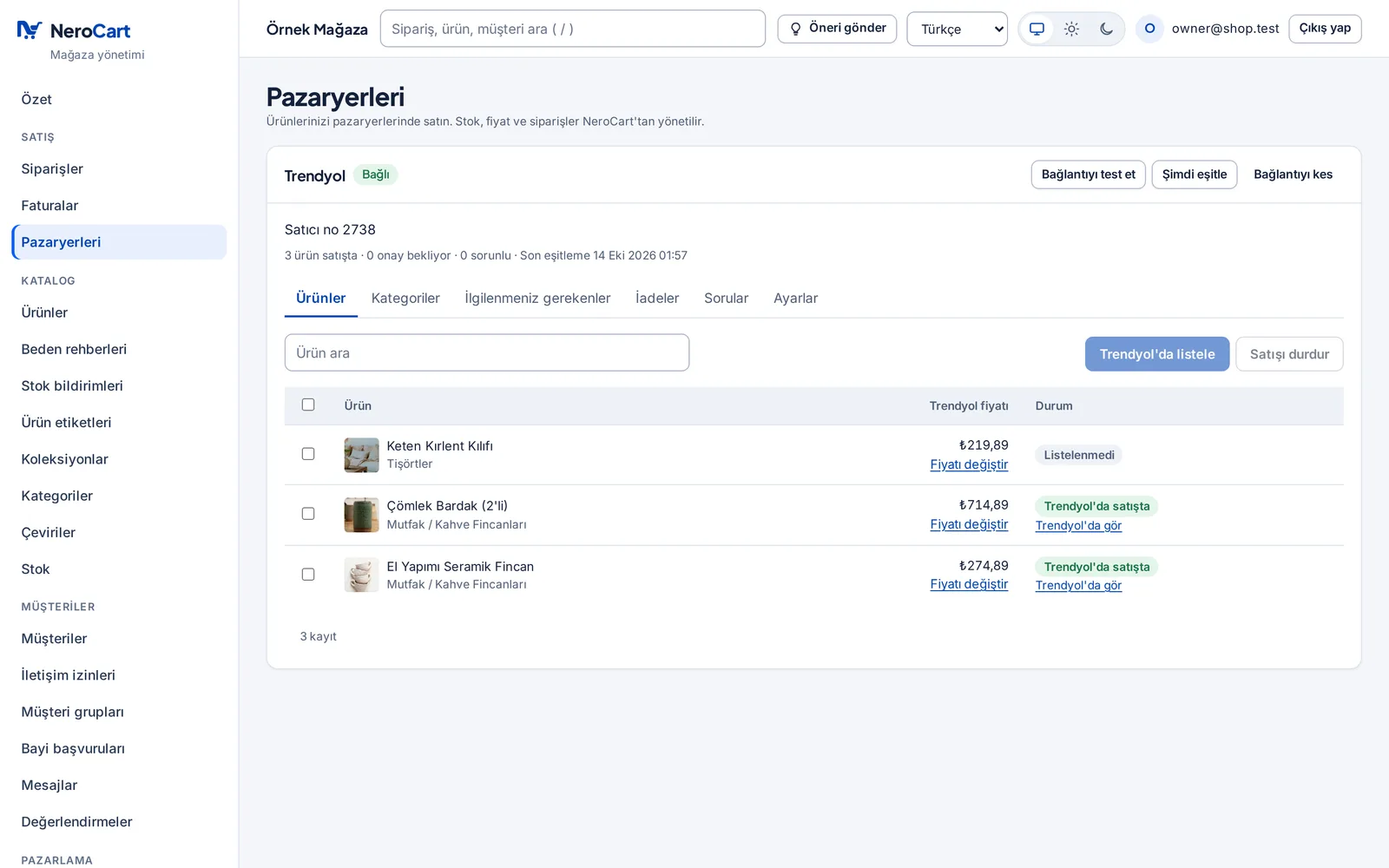
Managed from one panel
Category mapping and bulk listing; stock and price pushed when they change, with a percentage or amount added to the price. Marketplace orders in your own list, with a badge; returns and customer questions in the panel too (as far as each marketplace allows).
Who it is for Marketplace sellers
Trendyol
Product and category mapping, stock and price, orders, shipping, invoice links, returns and customer questions.
Who it is for Marketplace sellers
Hepsiburada
Listings, stock and price, orders and shipping, returns and questions; invoices go as a link.
Who it is for Marketplace sellers
n11
Listings, stock and price, orders with the marketplace's shipping, returns and questions.
Who it is for Marketplace sellers
Pazarama
Listings, stock and price, orders, shipping, returns and questions.
Who it is for Marketplace sellers
Çiçeksepeti
Listings, stock and price, orders and shipping; seller cancellations are made in Çiçeksepeti's own panel.
Who it is for Marketplace sellers
Amazon (amazon.com.tr)
Listings, stock and price, orders and shipping. Invoices, returns and customer questions stay in Amazon's own panel.
Who it is for Marketplace sellers
Ozon
Listings, stock and price, orders. Ozon needs each product's weight and dimensions, which you keep on the product.
Who it is for Marketplace sellers · Cross-border sellers
TikTok Shop
Listings, stock and price, orders; with your seller account in one of the 19 countries where TikTok Shop takes local sellers.
Who it is for Marketplace sellers · Cross-border sellers
Türkiye is not one of these countries.
05Products and catalogue
Describe your product in full detail
Colour and size options, ingredients, shelf life, size charts, brand pages: everything a customer might ask is on the product page. You change the price and stock of hundreds of products in one table.
Products and variants
Variants by options such as colour and size; categories and collections. Import and export your products in bulk as CSV.
Who it is for Every store
Product fields
Extra details you want on your products: ingredients, shelf life, origin, “is it vegan?”. As text, number, yes/no, date or link.
Who it is for Every store · Producers and suppliers
Bulk price and stock
All variants in one table; change price and stock in place. A row with an error stays red and says why.
Who it is for Every store · Wholesalers and dealers
Size guides
Make size tables once and link them to products; they open from a link on the product page.
Who it is for Every store
Brands
Each brand gets its own page with logo and description; customers browse by brand.
Who it is for Growing brands · Every store
Product badges
Put your own badges such as “Made locally” or “Handmade” on products by hand or by rule; a product card shows up to two.
Who it is for Every store
Rule-based collections
Fill a collection by hand or set a rule; the products that match join on their own.
Who it is for Every store
Personalised products
Name, note, date, colour or photo upload fields on the product page; choices can add to the price.
Who it is for Every store · Growing brands
06Design and content
Change how your store looks yourself, without code
You start with a theme that suits your trade and then change colours, type, menus and sections as you like. In the free design editor you build a page by drag and drop.
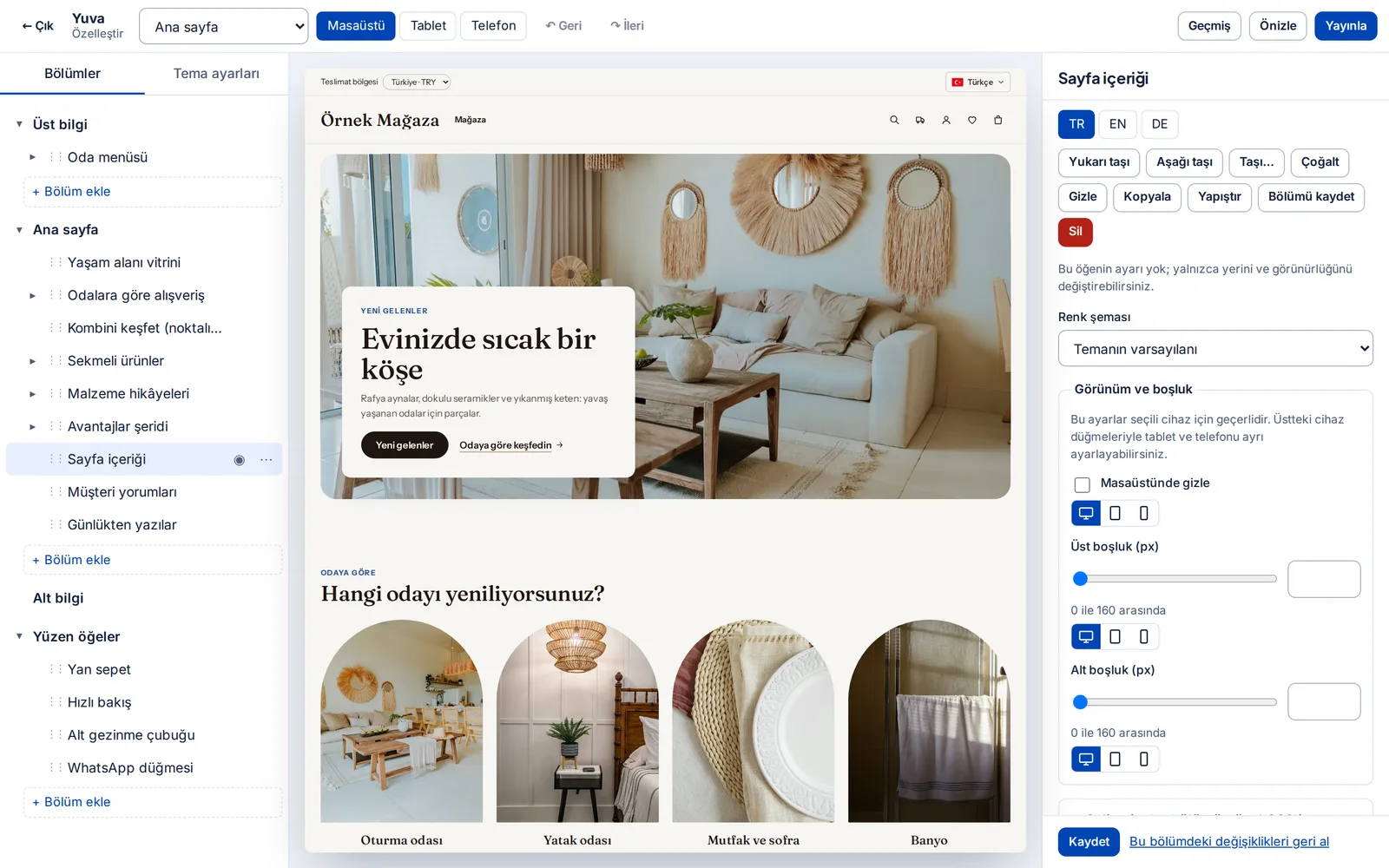
30 ready themes and demos for 26 sectors
Each theme is made for a trade and most have a demo store you can browse. Preview yours; the theme you pick waits as a draft until you publish it.
Who it is for Every store
Free design editor
Build a page on the canvas by drag and drop: text, pictures, layout and live product blocks. Design your home page or a part of the theme freely.
Who it is for Growing brands · Every store
Theme editor
Colours, fonts and type sizes, logo; header and footer builder, named menus. See each change on desktop, tablet and phone.
Who it is for Every store
Pages and sections
Build pages from ready sections: video, FAQ, contact form, map and more. 301 redirects from old addresses to new ones, in bulk by CSV.
Who it is for Every store
Blog
Posts, categories and authors. Keep drafts, publish when ready; reader comments show once you approve them.
Who it is for Growing brands · Marketers
Stories
Round stories at the top of the home page: show a new product, an offer or behind the scenes in short pictures.
Who it is for Growing brands · Marketers
Popup studio
Design popups for newsletter sign-ups, announcements, single-use discount codes or a prize wheel. Choose when, on which pages and to whom they show, and test two versions A/B.
Who it is for Marketers
Media library
Your photos and documents in one place, with descriptions. The announcement bar and trust badges come from the store add-ons.
Who it is for Every store
07Marketing and SEO
Find new customers and bring the ones you have back
The SEO autopilot fills in the titles and descriptions search engines need. A reminder goes to whoever left a cart, and points come with the next purchase; e-mail, SMS and discount tools are in the same panel.
SEO centre and autopilot
The autopilot fills missing titles, descriptions, focus keywords and image alt texts in every store language. It never touches what you wrote; it only proposes, and you review.
Who it is for Every store · Marketers
Without an AI key it fills by rules; with a key the texts are better.
Google tools
Search Console, Analytics, Tag Manager, Merchant Center and Google Ads; you connect your Google account and approve the setup.
Who it is for Every store
Bing and Yandex
Verify your site and submit your sitemap. Changed pages are reported to the search engines automatically (IndexNow).
Who it is for Every store · Cross-border sellers
Ad campaigns
Start campaigns on your own ad accounts; you pay the ad platform directly. You can set a monthly budget cap.
Who it is for Marketers
Discounts and campaigns
Discount codes and automatic discounts, with a minimum basket and a usage limit. Group them into campaigns with a calendar and a budget.
Who it is for Every store
Gift cards
Gift cards with a balance, used in full or in part at checkout. A card sold in the store is created on its own once paid.
Who it is for Every store
Product bundles
“Buy together” bundles: a bundle discount on products bought together.
Who it is for Every store
Customer segments
Customer lists that update themselves by your conditions; send your campaigns to them.
Who it is for Marketers
E-mail and SMS campaigns
Write once and send to a segment or all customers, now or scheduled. Only those who consented receive it, and every e-mail has an unsubscribe link.
Who it is for Marketers
SMS needs your İleti Merkezi account.
Automatic e-mails
Welcome, win-back, birthday and post-order thank-you e-mails; to those who consented, each once.
Who it is for Marketers · Repeat sellers
Cart reminders
Up to three reminders by e-mail or SMS to a customer who left a cart; each step can carry a single-use discount code.
Who it is for Every store
Points and referrals
Points on every paid order, turned into store credit, and a reward for referring a friend. A cancelled order's points are taken back.
Who it is for Repeat sellers · Growing brands
Affiliates and influencers
Each partner gets their own link or code; commission on paid orders, taken back on cancellation.
Who it is for Marketers · Growing brands
Web push notifications
Once a customer turns on notifications in their account, you can send your campaigns to their browser.
Who it is for Marketers
Tracking tags
Google Analytics, Tag Manager, Google Ads, the Meta pixel and the TikTok pixel; product view, add to cart, checkout and purchase events. All behind cookie consent.
Who it is for Marketers
08Customer experience
Your customers shop with ease, and you answer every question from one place
Your customers sign in with Google or Apple, save favourites and leave reviews with photos. Product questions, the contact form and live chat each have their own list in the panel.
Customer accounts
Sign-in by e-mail or with Google and Apple. My orders, saved addresses, order again; customers can download their data or close their account (KVKK).
Who it is for Every store
Google and Apple sign-in need your own sign-in app details.
Favourites and back-in-stock alerts
Customers save favourites and hear once when a sold-out product is back or a favourite's price drops.
Who it is for Every store
Reviews
Reviews with photos, a verified-buyer mark and moderation; a review request by e-mail after the order. A product with no approved review shows no stars.
Who it is for Every store · Growing brands
Product questions
Customers ask on the product page; your answer shows there and is e-mailed if they left an address.
Who it is for Every store
Live chat
Messages from your store's chat box arrive in the panel. If you like, an AI shopping assistant answers first and hands over to your team when needed.
Who it is for Every store · Teams
The assistant needs your store's own AI key.
Contact messages
Contact form messages in one inbox; your reply goes to the customer by e-mail. Forms are spam-protected.
Who it is for Every store
09Wholesale and B2B
Give your dealers their own prices; retail customers do not see them
You run retail and wholesale in the same store. Dealers apply with their tax number; the ones you approve get their own price list, case sizes and quantity prices. A customer planning a large order asks for a quote in one click.
Wholesale
Show prices to approved dealers only; dealer applications, cases and minimums, tiered prices and quote requests. Switched on under Settings › Wholesale.
Who it is for Wholesalers and dealers · Producers and suppliers
Company accounts
Keep business customers with their tax details, price group and the people who buy for the company.
Who it is for Wholesalers and dealers
Group prices
Give customer groups a price list; a member who signs in sees and pays those prices.
Who it is for Wholesalers and dealers · Repeat sellers
10Abroad, languages, currency
Customers abroad buy in their own language and currency
The micro-export and e-export tools are in this package; there is no higher tier. A customer from a country you sell to sees prices in their own currency, and you prepare the export invoice, the products' HS codes and UPS's customs invoice in the same panel. Your store opens on your own domain.
Your own domain
Your store opens at your own address; you verify your domain with a DNS record, and we handle the SSL certificate and its renewal.
Who it is for Every store
A store in 12 languages
Turkish, English, German, French, Italian, Spanish, Dutch, Danish, Swedish, Polish, Russian and Arabic (right to left). You keep product and page texts per language.
Who it is for Cross-border sellers · Every store
Legal text templates are in Turkish, English and German.
Translation centre
Translations move through draft, reviewed and approved; brand names are protected in a glossary, and you can work in bulk with CSV. Machine translation can start through DeepL or AI.
Who it is for Cross-border sellers
Machine translation needs your own DeepL or AI key.
Currency and prices per country
You group the countries you sell to into markets and give each its language and currency; the visitor's country picks the market by itself. You enter prices by hand or have them worked out from the European Central Bank rate (four times a day) with a markup and rounding, or fix the rate yourself.
Who it is for Cross-border sellers
Export invoices (e-export)
On an order going abroad you enter the delivery term (Incoterms: CPT, DAP, DDP…), the transport mode, the ETGB or GTB number, the customs office and the buyer's tax or passport number. The invoice is issued as an e-Invoice of the EXPORT type, with each line's HS code.
Who it is for Cross-border sellers
Today the export-type invoice is issued through Nilvera; you need a Nilvera account.
Foreign-currency invoices at the TCMB rate
An order paid in euros or dollars is invoiced at the Central Bank of Türkiye's buying rate of the previous working day. You decide whether the invoice is issued on payment or on shipment, the freight line and the note every export invoice carries (such as “Origin: Türkiye”).
Who it is for Cross-border sellers
An HS code and origin for every product
You keep each variant's HS code (GTİP) and country of origin on the product page, and invoices and customs papers are filled from there. If you do not know the code, the assistant looks at the product's name and category and suggests the closest lines of the customs tariff; you choose.
Who it is for Cross-border sellers · Producers and suppliers
Duties included (DDP) or paid on delivery (DAP)
You choose per market: the customer pays import duty and import VAT at checkout, or when the parcel is delivered. A calculator shows what a product will cost to send to a country.
Who it is for Cross-border sellers
You enter the duty rates by HS code yourself; the official tariff is not built in.
Legal text templates
Distance sales contract, pre-contract information, KVKK, cookie, returns and privacy texts, as drafts filled with your store's details.
Who it is for Every store
They are drafts; review them with your legal adviser.
11Supply Network
Sell without holding stock, or let other stores sell your products
As a seller you add suppliers' products to your store and the supplier ships the parcel. As a producer you open your product once and sellers sell it in their stores. In the same package since 12 October 2026; NeroCart takes no commission on network sales today (0 %).
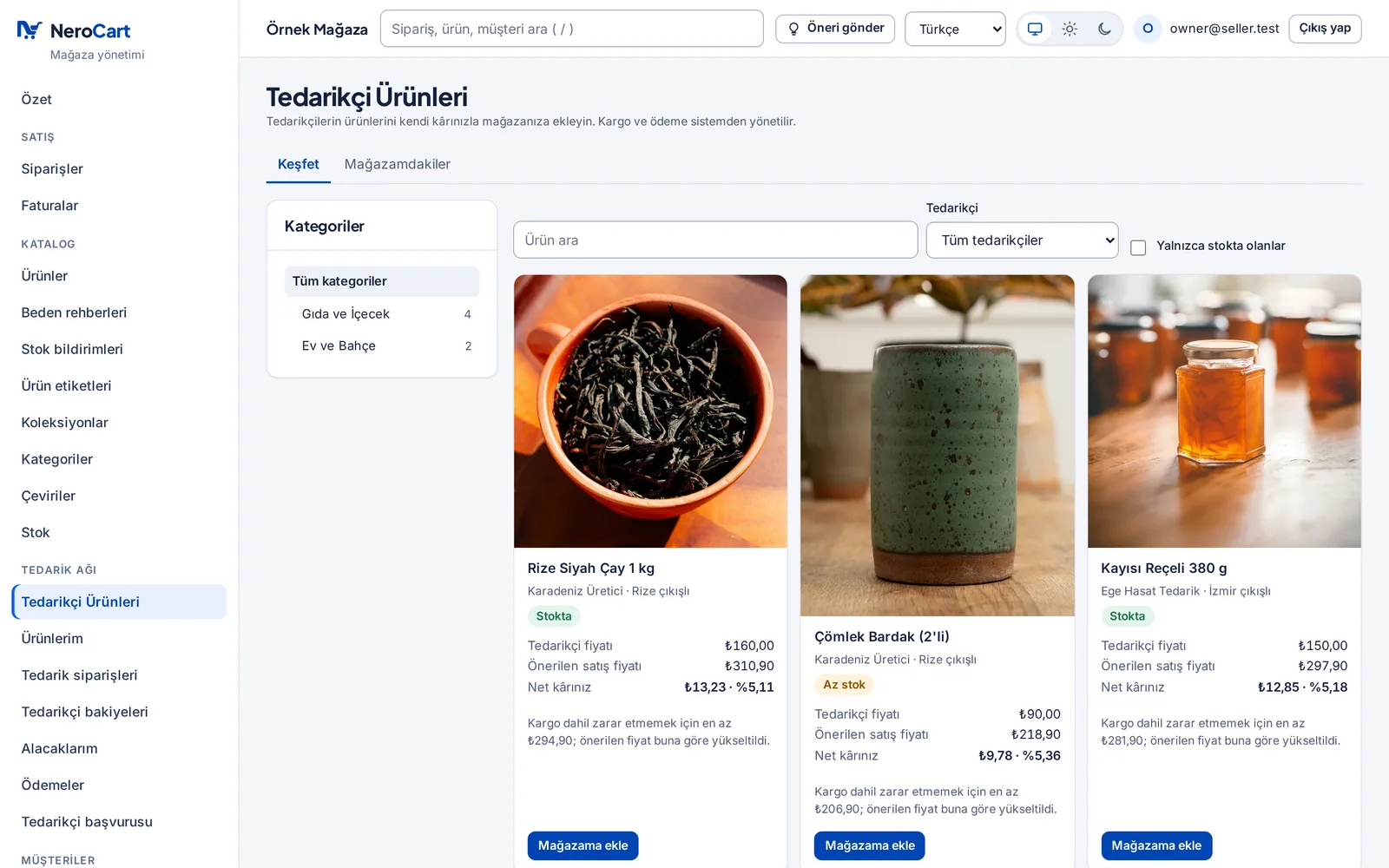
Supplier products
Browse by category or supplier with your net margin on every card. “Add to my store” brings the product in as a draft.
Who it is for Sellers without stock
Margin breakdown and rules
Every item from the sale price to what you keep; margin rules as a percentage or an amount.
Who it is for Sellers without stock
Supplier application
Apply in the panel with your tax number, IBAN and documents; NeroCart approves. You choose which products the network sells, the supplier price and the preparation time.
Who it is for Producers and suppliers
Supply orders
The supplier accepts, prints the label and ships; the seller sees every step.
Who it is for Producers and suppliers · Sellers without stock
Hidden customer details
The supplier's screens do not show the customer's phone, e-mail or street; only district and province. The parcel label carries the name and address the carrier needs.
Who it is for Sellers without stock · Producers and suppliers
Balances and statements
The seller records payments and the supplier confirms; both see the statement and the CSV.
Who it is for Sellers without stock · Producers and suppliers
12Team, security, reports
Everyone on your team sees only their own work
Your warehouse staff see the orders, your accountant sees the invoices; you choose who gets which screen. Sign-ins are protected by two-step verification. You follow sales in the reports and where visitors come from in analytics.
Team and roles
Invite your team and give permissions with ready or custom roles; make two-step verification mandatory for a role.
Who it is for Teams
Two-step verification
A one-time code from an authenticator app at panel sign-in, with recovery codes in case it is lost.
Who it is for Teams · Every store
KVKK, cookie consent and İYS
Cookie consent is recorded and third-party tags load only after it. Commercial message consents and blocks on one screen, with İYS records.
Who it is for Every store
API and webhooks
Your programs reach the store with API keys. Events go to your addresses as signed webhooks, with a delivery log and resend in the panel.
Who it is for Developers
Sales reports
Sales by currency (rates never mixed), the conversion funnel, customer value and repeat rate, and in-store search terms (including those with no results).
Who it is for Every store
Visitor analytics
Who came to your store, from where, what they did and how long they stayed, on NeroCart's own analytics screen.
Who it is for Marketers · Every store
What we are working on
What we are building right now
None of these work today. When one is ready, we announce it with its date on the What’s new page.
What’s new- Coming soon
NeroPay
NeroCart's way to take card payments without a virtual POS contract of your own: payments will go through licensed payment institutions. Being built; we will announce it with its date on the What’s new page.
Who it is for Every store
- Coming soon
WhatsApp, Instagram and Facebook shops
Your products from the same catalogue on WhatsApp, Instagram and Facebook; messages in a shared inbox, payment always on your store's checkout. The software is ready and waits for Meta's app approval.
Who it is for Selling by phone and chat · Growing brands
- Coming soon
Direct carrier connections
Connecting to Yurtiçi, Aras, MNG, PTT and Sürat directly with your own contract. Today you ship with them through Basit Kargo.
Who it is for Every store
- Coming soon
Automatic payment split in the Supply Network
The customer's payment split between seller and supplier automatically through a licensed payment institution. Today the seller sees what it owes the supplier in the panel and pays it.
Who it is for Sellers without stock · Producers and suppliers
- Coming soon
ETGB sheet and a daily document folder
The day's shipments abroad will be gathered in an editable ETGB sheet whose columns you set, downloadable as .xls. Invoices, labels and commercial invoices will sit in the day's folder, downloadable in one go.
Who it is for Cross-border sellers
- Coming soon
A.TR sorting and scheduled e-mail to the carrier
Papers for shipments to EU countries worth more than 150 euros will go into an A.TR folder. The day's papers will be e-mailed with your signature to your carrier's addresses at the times you set; on a day without shipments, nothing is sent.
Who it is for Cross-border sellers
- Coming soon
Domestic and international sales in separate areas
Domestic payments, shipping and e-Archive will sit in one area; foreign payment systems, UPS, HS codes, Incoterms and export invoices in the other. Your store will be able to sell at home only, abroad only, or both.
Who it is for Cross-border sellers · Every store
- Coming soon
Hidden stock and automatic preparation
Only you will see the count of the few pieces you keep on hand; customers will not see it and it will not limit sales. If you switch it on, a paid order this stock covers will get its invoice, shipment and label prepared by itself.
Who it is for Cross-border sellers · Producers and suppliers
Package
Everything on this page is in one package.
Every feature above is in this package. You pay once a year.
NeroCart E-Commerce Package
One packageTRY 15,000/ year
VAT included · paid once a year
- Every order in one list, bulk actions, a shop till, payment links, order rules and repeat orders
- Over 40 payment providers, smart routing between several POS, instalments, bank transfer and cash on delivery
- e-Archive and e-Invoice, bookkeeping and ERP links, eight carriers through Basit Kargo and UPS, stock per warehouse
- Your Trendyol, Hepsiburada, n11, Pazarama, Çiçeksepeti, Amazon, Ozon and TikTok Shop shops in the same panel
- Variants, custom product fields, a bulk price and stock table, size guides, brands and personalised products
- 30 ready themes, a drag-and-drop design editor, pages, blog, stories and popups
- SEO autopilot, Google, Bing and Yandex, discounts and gift cards, customer segments, e-mail and SMS, cart reminders, points and affiliates
- Customer accounts, Google and Apple sign-in, favourites, photo reviews, product questions and live chat
- Wholesale with prices shown to dealers only, dealer applications, company accounts and group prices
- Micro export and e-export: export invoices, HS codes, TCMB rates, UPS shipping abroad; 12 languages, a currency per country, your own domain
- Supply Network: sell suppliers' products without stock, or open yours to sellers
- Team roles, two-step verification, KVKK and İYS, API and webhooks, sales reports and visitor analytics
Questions about the features
Is everything on this page in the package?
Every feature that works today is in the same package. The fees of outside companies such as payment, e-invoicing, shipping and marketplaces are paid separately under your contracts with them.
What do I need to take card payments?
A virtual POS contract with a bank, or a contract with a payment institution such as iyzico or PayTR, and its API details. You enter them under Settings › Payments. With several POS, smart routing spreads each payment by your rules.
Can I change my store's design myself?
Yes. In the theme editor you change colours, type, menus and sections with a live preview; in the free design editor you build pages by drag and drop. No code needed.
What is NeroPay, and can I use it today?
No, not today. NeroPay will be NeroCart's way to take card payments without a POS contract of your own; payments will go through licensed payment institutions. We will announce it with its date on the What’s new page when it is ready.
Is there a separate package for selling abroad?
No. Export invoices, HS codes, foreign-currency invoices at the TCMB rate, UPS shipping with a customs invoice, a currency per country and 12 languages are all in this package. The Micro export page shows step by step how an order goes abroad.
What if a feature is missing?
Write to us. There is also a “Send a suggestion” button in the panel; what we add is listed with its date on the What’s new page.
Open your store today.
One package, TRY 15,000 a year, VAT included. Everything on this page is in it.